
Claims
Protect your home and land by setting up claims!
V1.0.0

This guide goes into details about the fact that claims must be 'powered'. Until our server is public, power requirements for claims is disabled. All existing players will also receive a music disc, which acts as 1 year worth of fuel.
Creating Claims
To get started with protecting your land, you must first claim a chunk.
/c claim will claim the chunk you are currently standing in.

Once you have claimed your first chunk, you need to create a power cell within 10 minutes. Protected land needs to contain a power cell. This keeps your land protected and prevents players from claiming land that never gets used.
A power cell can be created by placing a empty single chest inside the chunk you have claimed, and filling the middle with specific items.
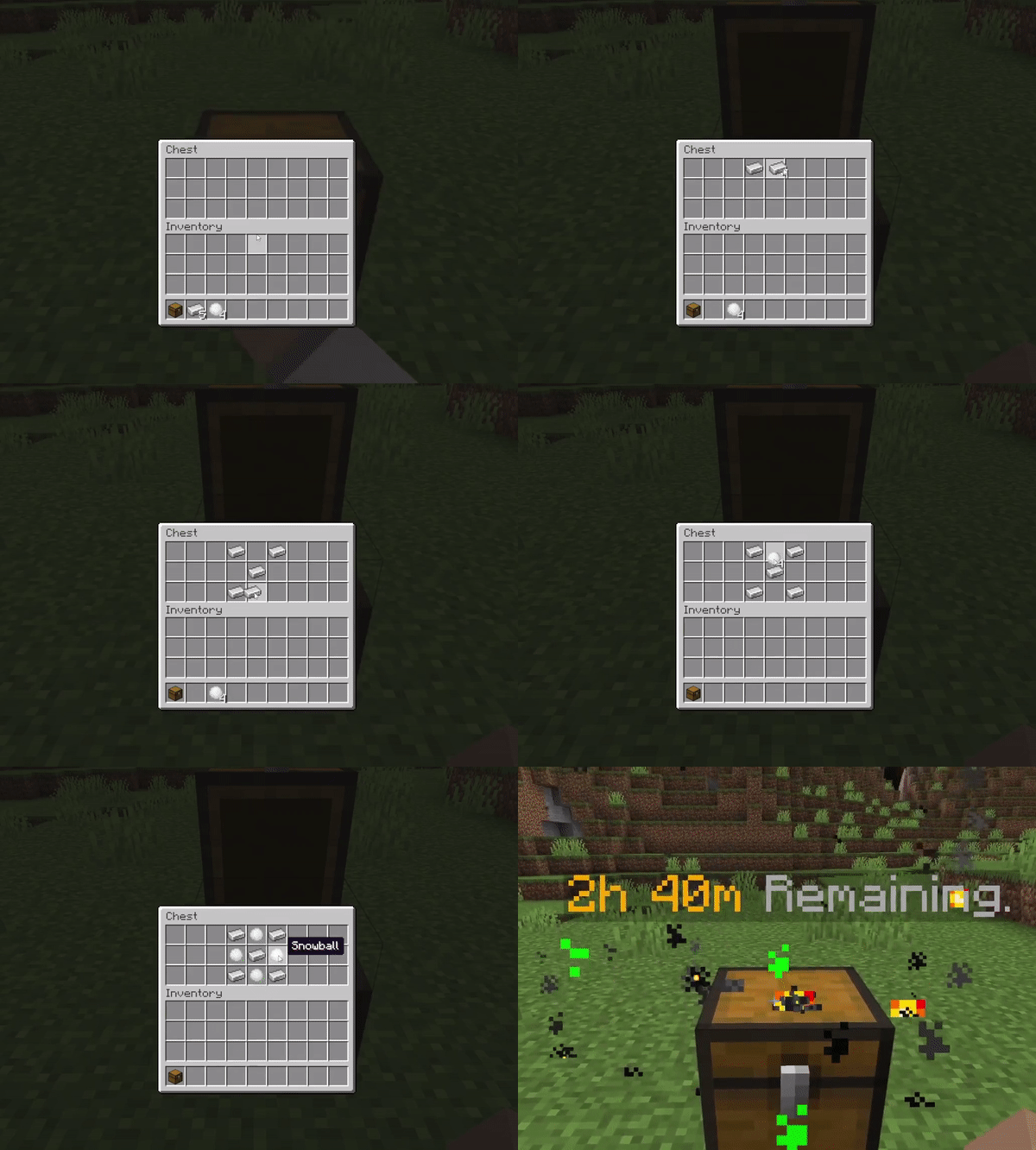
The current power cell recipe can be seen above.
If you forget, or the recipe gets changed, you can run /c recipe to see the latest.
You can add additional time to your power cell, by providing fuel or money. The value of fuel is described below.
| Fuel Type | Power in Minutes |
|---|---|
| Iron | 30 |
| Music Disc 'Mall' | 525,600 |
Add additional chunks to your claim with the same /c claim command.
Each additional chunk will slightly change the power provided by fuel.
The power provided by fuel is calculated with the following formula:
Fuel Value / (Number of Chunks * 0.1)
Your power cell must always have fuel available. If it runs out, your claim will be dissolved after 30 minutes and your land becomes unprotected!
Once you have created your claim, you are free to move your power cell to other places inside your claim.
Destroy the power cell to drop all the fuel inside, and place it somewhere else.
Repeat the recipe in the middle of the chest to re-create the power cell.
You must re-create the power cell within 30 minutes of destroying it. Otherwise, your claim will be dissolved.
Modifying Claims
Todo
Inviting Members
You can allow friends access to your claim, by inviting them to join your claim. This will allow them access to your property.
| Command | Outcome |
|---|---|
| /c invite [playername] | Invites a player to join your claim. |
| /c accept | Accept the latest claim invitation. |
Be careful who you invite to join your claim. With this access players can potentially damage your property or take resources.
Updating Claim Settings
Todo
Setting Claim Home Points
Todo
Removing/Banning Players
In some instances you may want to ban or remove a player from your claim. You can also remove bans afterwards. Kicking a member will remove a player from your claim. A ban will prevent a player from entering your claim at all.
| Command | Outcome |
|---|---|
| /c ban [member] | Bans member from your claim. |
| /c unban [member] | Unban member from your claim. |
Deleting Claims
Todo